Introduction
Disclaimer!
Before we start, I want to note that everything in this talk is either a well-established fact or the author’s subjective opinion. If you disagree with it — that’s fine, go write your own talk.
Agenda
In this talk we’ll cover:
- How one of the most-used programming languages came to be
- Why most developers don’t like it
- Whether JS is actually a bad language
Love and hate
JavaScript is a unique language. Nobody really likes it, yet everyone uses it everywhere.
But why? What is it that people actually dislike about JS? Why did JS turn out the way it did? Where can undefined behavior lead? What languages could replace JS? We’ll talk about all this and more today.
The numbers
JS holds a firm grip on most popularity rankings
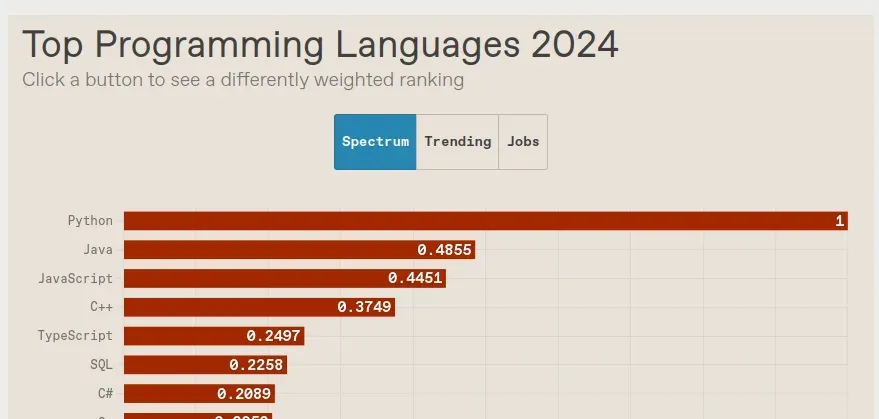

Which isn’t surprising: as we’ll see, JS is a genuine monopolist in the frontend world.
So, let’s start with a brief history lesson.
A brief history
Backstory
In the mid-1990s, during the rapid growth of internet technology, Netscape Communications — the creator of the popular Netscape Navigator browser — ran into the need to extend what web pages could do. The technologies available at the time didn’t allow for any client-side interactivity, which severely limited what web development could achieve. Animations and everything like that were also out of reach.
Why a new language was needed
Marc Andreessen, Netscape’s co-founder, pushed the idea of “dynamic HTML,” which required a scripting language that would:
- Be easy to pick up for non-professional developers
- Not require compilation
- Run directly in the browser
- Have syntax that was understandable to a wide audience
Existing languages were considered first (Python, Tcl, Scheme), but none of them checked every box. Scheme in particular, despite its elegance, had syntax too far removed from mainstream programming languages. Let’s not forget it’s a Lisp dialect, after all :)
Meanwhile, Sun Microsystems was actively developing Oak (later known as Java). Netscape Communications was working closely with Sun, which ultimately left a heavy mark of Java’s influence on the final version of JavaScript.
You might be wondering: why not just use Java itself as the browser language? The answer is obvious — go back to point 4.
The first prototype
Brendan Eich, a Netscape employee at the time, was tasked with building a language prototype on an extremely tight deadline. Naturally, given such deadlines and such a chaotic time (remember, this was during the browser wars, when there was zero consistency between browsers), the result was maximally messy. This was the first version of JavaScript. Work on it ran from May to December 1995.
They picked a name that fit perfectly — Mocha. And right from its very first release, it showed off exactly what it was.
The end result looked like Java on the surface (thanks to the deal with Sun), while underneath it was really Scheme with prototypal inheritance (more on what that means later).
What to do about the name Mocha
A lot of thought went into the branding, and the language ended up going through a few renames
- Mocha (working name) → LiveScript (when first shipped in Netscape Navigator)
- LiveScript → JavaScript (because of the Sun deal)
Original sins
Under such spartan conditions, there was no way the language would come out convenient, scalable, or reliable. Workarounds became JS’s faithful companion for the rest of its days, all because of fundamental problems baked into the very first version of the language. In this chapter we’ll look at the main problems you’re likely to run into when working with JS.
Type coercion
JavaScript is famous for its far-from-obvious type coercion rules. There isn’t much to say about it beyond: that’s just how the language was put together. We’ll just look at some entertaining examples of the language’s surprising behavior, and try to explain them.
Arithmetic operations
"4" + 2    // "42" (2 -> "2")
"4" - 2    // 2    ("4" -> 4)
"4" * "2"  // 8    ("4" -> 4, "2" -> 2)
"4" / "2"  // 2    ("4" -> 4, "2" -> 2)
"4" ** "2" // 16   ("4" -> 4, "2" -> 2)
As you can see, arithmetic operators coerce strings to numbers whenever there’s no corresponding string operation defined. In this example, + is overloaded for concatenation, so if at least one of the operands is a string, both get added as strings. Nothing complicated so far.
Arithmetic operations 2: the return
Now let’s pull out the single spookiest, least-understood phenomenon from JS’s bag of tricks — adding non-mathematical objects together.
Examples first — explanations after
[] + []   // ""

[] + {}   // "[object Object]"

{} + []   // 0, but "[object Object]" if you console.log it

{} + {}   // NaN,
          // but "[object Object][object Object]" if you console.log it
Why does this happen, and why do we get such strange results? Under the hood, JS converts objects through a strictly defined algorithm:
Symbol.toPrimitive(), if it existsvalueOf()toString()
By the end of it, it’s guaranteed to get a primitive (a number, boolean, or string). Those it can work with.
Going back to the examples above, some of these conversions stop looking like magic:
[] + []   // [] -> "", [] -> "", "" + "" = ""

[] + {}   // [] -> "", {} -> "[object Object]",
          // "" + "[object Object]" =  "[object Object]"

{} + []   // See the explanation below.

{} + {}   // {} -> "[object Object]", {} -> "[object Object]",
          // "[object Object]" + "[object Object]" =
          // = "[object Object][object Object]"
So how does that explain {} + []?
It doesn’t — that’s JavaScript for you. It’s a parser quirk: outside of something like console.log, the parser sometimes interprets {} + [] as {} → undefined and +[] → 0 (as a unary plus). And it’s important to understand here: +[] is genuinely a unary operation, not undefined + 0.
Wow, so what if we try to operate on arrays and numbers?
[] - 1            // -1 ([] -> 0)
{} - 1            // NaN ("[object Object]" - 1 -> NaN)
[5] * [2]         // 10 ([5] -> 5)
[1, 2] - [3, 4]   // NaN ([1, 2] -> "1, 2")
Now that we know the algorithm, it’s not quite so mysterious or scary anymore, right? And we’ve only just begun — time for unary operations on objects!
+[]       // 0 ([] -> "" -> 0)
+{}       // NaN ({} -> "[object Object]" -> NaN)
-[]       // -0 (-0 === 0)
-{}       // NaN
Nothing special here, it’s just the usual conversion to Number.
Now that you know the algorithm above, it’s not hard to guess how operations over null, NaN, and undefined turn out. We won’t dwell on those for the sake of brevity.
Prototypal inheritance
Prototypal inheritance is a fundamental JavaScript mechanism that’s radically different from classical OOP — which is exactly why OOP in the sense you’re used to simply isn’t possible in JS. Let’s walk through it.
The object model
Yes, JS does have objects (also called prototypes — hence the name of the paradigm). To group them into class-like units, every object carries a hidden [[Prototype]] property, accessible through __proto__:
const Animal = { eats: true };
const Rabbit = { jumps: true };

Rabbit.__proto__ = Animal; // now Animal is Rabbit's "parent"

console.log(Rabbit.eats);   // true
When you access a property on an object, JS first checks the object itself, then its [[Prototype]]. This repeats up to the last prototype in the chain; if it’s still not found, the property simply doesn’t exist.
const Animal = { eats: true };
const Rabbit = { jumps: true, __proto__: Animal };
const Richard = { owner: "Robert", __proto__: Rabbit };

console.log(Richard.eats); // Richard.__proto__.__proto__.eats
Modern prototypes
The approach above is considered outdated; the recommended way is a bit different:
const Animal = { eats: true };

const Rabbit = Object.create(Animal);
console.log(Rabbit.eats); // true
console.log(Object.getPrototypeOf(Rabbit) === Animal); // true

Object.setPrototypeOf(Rabbit, { jumps: true });
console.log(Rabbit.jumps); // true
What’s wrong?
Sure, you could argue this doesn’t look like OOP, isn’t intuitive, and so on — but personally that’s not what bothers me. For me, the real problem is the complete lack of any privacy for object fields:
const Secret = {
  _token = 696969,
}

console.log(Secret._token) // An illusion of security
What about classes, though?
A particularly attentive reader might point out that, strictly speaking, JS does have classes:
class Animal {
  constructor(name) {
    this.name = name;
  }

  speak() {
    console.log(`${this.name} makes noise`);
  }
}
But this is just syntactic sugar on top of prototypal inheritance. Remember that phrase, by the way — syntactic sugar. You’ll be hearing it a lot while working with JS.
for in practice
There are actually quite a few gotchas, and most of them sit pretty close to the surface. I do want to highlight one example of somewhat non-obvious behavior:
const animal = { eats: true };
const rabbit = { jumps: true, __proto__: animal };

for (let prop in rabbit) {
  console.log(prop); // jumps, eats
}

Object.keys(rabbit); // ['jumps']
As you can see, the loop iterates over every property — even inherited ones — while Object.keys only returns the object’s own properties.
Be careful with this one!
Syntactic sugar. An entire factory of it
Because of the friction and inconsistencies described in the previous chapter — and in its quest to become the friendliest language for everyone — JS has inevitably accumulated (and keeps accumulating) an enormous amount of syntactic sugar. As a result, the language stops being unambiguous in places, and code written in it becomes harder to read.
We won’t dwell too long on JS’s syntactic sugar — just a quick tour of some examples.
The top 8 ways to define a function
In JS, you can define a function in a whole pile of different ways:
function aboba(x) { return x }
aboba = function(x) { return x }
aboba = new Function('x', 'return x')
aboba = Function('x', 'return x')
aboba = (x) => { return x }
aboba = (x) => (x)
aboba = x => x
aboba = Object.assign(new Function, { ... })
The first two are the most ordinary — a function declaration and a function expression, respectively.
Next, we create a function via a constructor call. It’s an interesting technique, though it carries no practical value. We can also create it without new, which is even more absurd — what’s the point of new then? In truth, the only difference is that in the first case we explicitly call the Function constructor, and in the second we call it implicitly.
The following three are arrow functions. In some cases we can even drop the parentheses, and write the return value directly instead of a function body. This too is its own kind of syntactic sugar — omitting parentheses.
The last method is for the truly deranged. We create a function, convert it into an object, and tack on whatever properties we want. The result: a modified function with extra properties bolted on.
And yes, a function can be an object, and can have its own this context, which adds even more ambiguity. Do we have function contexts in, say, C++? In Rust? In Go? In Python… oh wait, Python does have that too. Can’t say it does Python any favors.
The JS ecosystem and lazy programmers
While you’ve been reading this chapter, the world has written at least 13 more JS libraries.
A guide to breaking the entire internet in 11 lines of code
In March 2016, the JavaScript world lived through one of the loudest crises in its history — an ecosystem collapse triggered by the removal of one tiny library, left-pad.
What is it, even? A small library written by Azer Koçulu, clocking in at 11 (total!) lines of code, that simply pads a string with spaces on the left:
module.exports = leftpad;
function leftpad (str, len, ch) {
  str = String(str);
  var i = -1;
  if (!ch && ch !== 0) ch = ' ';
  len = len - str.length;
  while (++i < len) {
    str = ch + str;
  }
  return str;
}
Doesn’t it seem like you could write this yourself in a couple of minutes? I think so too — but the developers of Babel and React would disagree with me. Thousands of projects depended on this library, installed through npm.
But then, one day, Azer Koçulu decided to simply delete all 273 of his modules from npm. He’s within his rights to do that, right? Well, yes, he is. Was anyone protected against this? No, nobody was.
At 11:00 UTC, left-pad vanished from the npm registry, which broke the builds of React, Babel, ESLint, and a bunch of other tools. Deploys at major companies like Netflix and Bloomberg ground to a halt on the spot.
And because of that, 2.5 hours later, npm did something it had never done before: it rolled back a deletion and introduced a new rule around removing packages (or rather, a ban on removing them).
But how did it even get to that point? The problem was deep dependency nesting:
react -> babel-preset-react -> babel-preset-es2015 -> babel-plugin-transform-es2015-modules-commonjs -> left-pad
After all this, Azer Koçulu left the JS community, and his GitHub and npm accounts got banned for several months. A #SaveThePad flash mob started on Twitter, and parody packages began popping up, like fck-left-pad — a one-line reimplementation.
All because of 11 lines…
Don’t reinvent the wheel
You might say: “okay, but how does this story relate to the ecosystem’s problems? People just shouldn’t install unpopular packages.”
You’re right! You shouldn’t install unpopular packages. And by that exact same logic — you also shouldn’t install packages that are too trivial! You’re perfectly capable of implementing that kind of functionality yourself.
Here’s the scary part — npm, dead serious, hosts libraries like:
- is-even: checks whether a number is even
- is-odd: checks whether a number is odd
- empt: checks whether an array is empty
- is-positive-integer: checks whether a number is positive
- array-index: returns the index of an element in an array
- is-ice-cream: checks whether a string contains an ice cream flavor
And if you think nobody actually uses these in production, remember the story above. I’m fairly sure people aren’t downloading these just for fun. Oh, and by the way, is-even gets over 200,000 downloads a week. Makes you wonder whether we actually know how to program at all…
How not to become a victim of absurdity
npm ls --depth=5 will solve all your problems. Be careful with packages in JS.
Alternative solutions
There have been attempts to save JS — both extensions of it, and entirely different languages. That’s what this chapter is about.
TypeScript
A superset of JS with static typing. On the plus side, it’s fully compatible with JS (you can migrate gradually). On the downside — types disappear at runtime, since TS has to compile down to JS.
WebAssembly (WASM)
This technology lets you write in any language that supports it. You could call it a special binary format for running code in the browser.
For example, Rust has a framework called Leptos — a great option for high-load, maximally responsive parts of an application, like a 3D renderer or complex animation.
It doesn’t fully replace JS (usually it’s used alongside it).
Dart
Originally written as a JS replacement, but it never caught on — and these days it’s paired with Flutter instead. Together they let you write cross-platform apps.
Elm
A solid attempt at building a JS killer. A fairly fast, strictly typed language. But it has a pretty steep learning curve because of its complex syntax (reminded me of Haskell).
All of this is a mistake
I don’t think we’ll be able to replace JS with any of the existing languages. The problem is that a countless number of sites are already written — including very old ones — and keeping backward compatibility with them matters.
On the other hand, why not create a genuinely good language that solves all of JS’s problems, and smoothly transition to it? Write new sites in the new language, and rewrite old ones as time allows? That question is open for discussion.
Closing the investigation
JS isn’t a great language. It has plenty of downsides, which is exactly why its ubiquity remains questionable. And yet it’s damn good for simple browser scripts, or honestly even for frontend development as a whole.
Maybe it took a wrong turn somewhere, or maybe the sins of its first draft left their mark — but either way, I can’t think of a good alternative to JS that’s a clear step up from it (besides TS).